




















Introduction to Packing Electronics for International Travel
Why Proper Packing Matters
Traveling internationally with electronics can be a source of stress for many travelers. Laptops, cameras, smartphones, and other devices are costly investments that hold valuable data and personal information. Proper packing ensures that these devices remain safe from physical damage, theft, or loss throughout the journey. Given the sensitivity and fragility of electronic equipment, treating packing as a strategic task rather than a last-minute afterthought is essential for a smooth and worry-free travel experience.
Common Risks to Electronics During Flights
Electronics face several challenges when flying internationally. Checked luggage encounters rough handling, temperature fluctuations, and pressure changes, increasing the chance of damage. Even carry-on bags can face jostling during boarding, overhead bin storage, or security checks, often leading to scratched screens or broken ports. Additionally, tangled or poorly packed cables are prone to wear and tear, while disorganized accessories raise the risk of losing small but critical items. Without proper precautions, travelers may return with malfunctioning devices or missing parts, disrupting their plans and causing unnecessary expense.
Choosing the Right Travel Gear
Protective Cases vs. Padded Bags
One of the primary decisions when packing electronics is selecting between hard protective cases and padded bags. Hard cases, such as the Pelican 1535 Air Case, offer superior impact resistance and weatherproofing, making them ideal for checked luggage or when carrying fragile camera gear. However, they can be bulky and heavier. On the other hand, padded bags like the PacSafe Vibe 25L Econyl Backpack provide built-in protection with cushioned laptop sleeves, RFID blocking features, and security zippers — perfect for carry-on use where accessibility and weight are concerns. Understanding the nature of your trip and your device’s vulnerability will help you choose the most appropriate option.
Must-Have Accessories for Electronics Safety
Organizing electronics goes beyond just picking a bag. Accessories such as the Peak Design Tech Pouch help keep small devices and cords neatly arranged, reducing clutter and preventing tangling. Using durable smartphone cases like the OtterBox Defender series protects phones from impacts, while camera enthusiasts benefit from specialized gear like Peak Design Camera Cubes, which provide padded compartments specifically designed for equipment. Additionally, external drives like the LaCie Rugged Mini ensure data safety against physical shocks, a critical consideration for photographers and videographers on the move.
Step-by-Step Packing Techniques
Preparing Electronics Before Packing
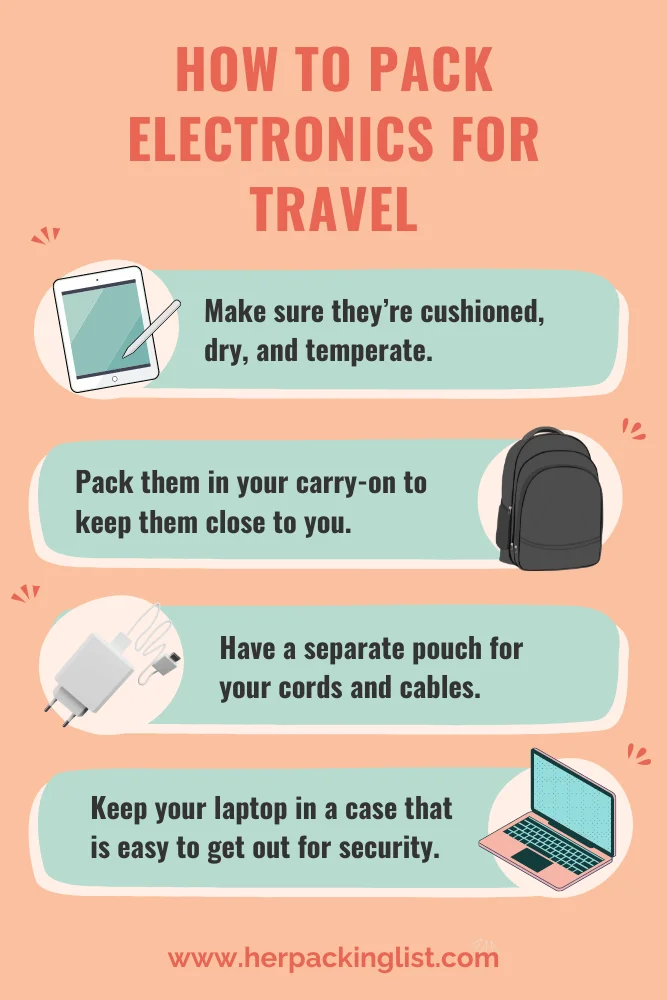
Before placing any device into your bag, it is crucial to power down electronics completely and remove any detachable parts such as batteries or memory cards. Testing backup batteries ahead of time prevents surprises like carrying dead power cells. Cleaning devices reduces dirt and debris that could cause damage or interfere with operation. Also, it is wise to pack only the essentials to avoid excess weight and unnecessary risk; bringing devices you won’t use only adds bulk and complicates organization.
Layering and Cushioning Strategies
Electronics need thoughtful layering to absorb shocks and avoid pressure points. Start by placing the heaviest or most fragile device at the bottom of your carry-on or hard case, cushioned by soft items like clothing or foam inserts. Fragile items should never be pressed tightly against one another. Adding layers of padding between devices ensures they remain stable during movement. For example, packing a backpack under the seat in front with fragile gear keeps items within arm’s reach and reduces the chance of jarring impacts that might occur in overhead compartments.
Organizing Cables and Accessories Efficiently
Loose cables are a major headache when traveling with multiple electronics. Instead of shoving them in pockets where they tangle and wear out, use a Grid-It organizer or small packing cubes to arrange cords systematically. Pinning car keys inside a mesh pocket within a packing cube minimizes loss, while storing chargers and adapters together in toiletry bags keeps them accessible yet secure. Simplifying your accessory setup by carrying only necessary cables and extras, such as memory cards and batteries, prevents overpacking and eases security inspections.
Handling Security and Customs Checks
Tips for Smooth Electronic Inspections
Security checkpoints can be daunting, especially when traveling internationally with multiple electronics. Making devices easily accessible in your carry-on eliminates fumbling and delays. Avoid packing electronics deep within bags where security agents must unpack your items. Keeping cables organized and devices in designated compartments helps speed inspections. Additionally, some travelers invest in TSA Precheck or Global Entry programs to streamline security, making it easier to carry and handle electronics during transit.
How to Avoid Damage During Security Screening
Electronic devices can be vulnerable to damage at checkpoints if not prepared properly. Prevent this by removing laptops and tablets from bags for separate scanning, reducing the risk of crushing by x-ray trays. Fragile gadgets should be cushioned within protective cases, and cables should be untangled to avoid snagging or pulling. Avoid placing devices directly against metal objects to minimize interference and potential harm. Taking these steps protects your electronics from scratches, impacts, and unexpected malfunctions caused by hurried security processes.
Additional Safety Tips During the Flight
Storing Electronics Properly in Carry-On Bags
During the flight, improper storage of electronics can still cause damage. Carry-on bags tucked into overhead bins may shift or fall, so placing delicate electronics in smaller backpacks or pouches that fit under the seat is wiser. This keeps devices secure and within reach. Use padded compartments to isolate gadgets from other items, and ensure your bag isn’t overstuffed to prevent crushing. Keeping earbuds or noise-cancelling headphones in dedicated pockets allows quick access for entertainment without disrupting your seatmates.
Using Power Banks and Charging Devices Safely
Power banks are essential for long international flights, but carrying and using them safely requires attention. Airlines impose restrictions on battery capacity; hence, verifying your power bank’s rating beforehand avoids confiscation. Store power banks in carry-ons rather than checked bags as mandated by most carriers. Charge devices before boarding and avoid charging during turbulence or unattended moments. Bringing compact, collapsible earphones with noise isolation further enhances comfort and reduces strain on your gadgets.
Conclusion
Summary of Best Practices
Keeping electronics safe on international flights requires deliberate planning, the right gear, and organized packing techniques. Avoid common mistakes like packing valuable devices in checked luggage or cramming them without protection. Prioritize protective cases suited to your equipment and use accessories to stay organized. Prepare devices before packing, cushion and layer them carefully, and arrange cables to prevent damage and loss. Navigating security smoothly means making electronics accessible and ready for inspection. Finally, during the flight, store devices prudently and handle charging devices with caution. By following these guidelines, travelers can minimize risks and enjoy their journeys with peace of mind.